Shopify BOGO app: which buy X get Y offer to run (with the margin math)
'Buy one, get one' sounds like one offer, but there are several, and they cost very different amounts. Before you pick an app, pick the offer. Here is the maths for each one and what the app has to handle.
For the step-by-step setup, see How to set up BOGO on Shopify. This guide helps you decide which BOGO to run.
What each BOGO offer really costs
Example only: a product that sells for $20 and costs you $8. "You keep" is the price paid minus the product cost, before shipping and fees.
| Offer | Items | Customer pays | Saving per item | You keep |
|---|---|---|---|---|
| No offer | 1 | $20 | 0% | $12 |
| Buy 1, get 1 free | 2 | $20 | 50% | $4 |
| Buy 1, get 1 half price | 2 | $30 | 25% | $14 |
| Buy 2, get 1 free | 3 | $40 | 33% | $16 |
| Buy 3, get 2 free | 5 | $60 | 40% | $20 |
In this example, buy 1 get 1 free leaves you with less than a single full-price sale. Buy 2 get 1 free keeps more than a single sale, and shoppers still understand it at a glance. Your numbers will differ, so run them in the bundle discount calculator before you choose.
Which products suit BOGO
- Good fit: things people use up or buy several of. Coffee, snacks, socks, candles, supplements, pet treats, printing.
- Good fit: products with a high margin and a low cost per unit.
- Poor fit: one-off purchases like furniture or a single gadget. Nobody wants two.
- Poor fit: heavy items where the free unit adds a lot to shipping.
What a BOGO app has to handle
- Show the offer before the cart. Shopify's built-in Buy X get Y discount works, but the shopper usually finds out at checkout. The offer needs to sit on the product page.
- Add the whole lot in one click. If the shopper has to go back and add the free item themselves, many will not.
- Mixed variants. Two flavours in a buy 2 get 1 should still work, with the free item priced correctly.
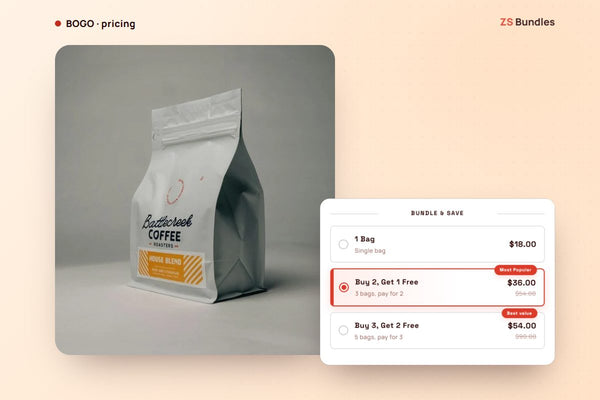
- Tiers in one offer. "Buy 1 get 1, buy 2 get 1, buy 3 get 2" as one choice, not three separate discounts you have to combine.
- No codes, re-checked at checkout. If the shopper removes an item, the free one should stop being free.
- Pricing that does not punish a good month. A BOGO that works well around Black Friday should not push you into a much higher bill.
How ZS Bundles runs BOGO
- Install ZS Bundles, press Turn on in theme, and Save.
- Create bundle deal → Buy X, get Y free. It starts with three tiers: buy 1 get 1, buy 2 get 1, buy 3 get 2. Remove the ones you do not want.
- Choose the products and Publish.
The tiers show above your Add to cart button. Customers can mix variants, and Shopify applies the price at checkout, with no discount code. The bundle uses your existing products.
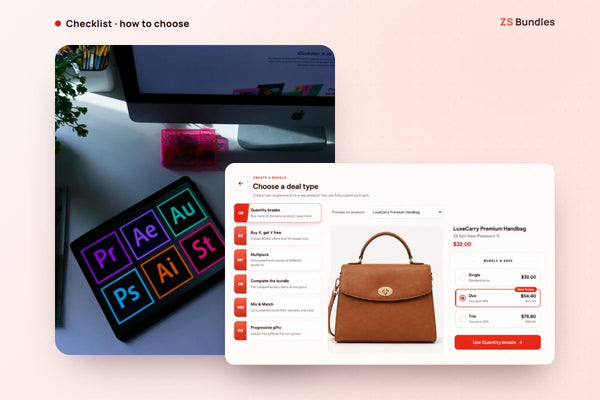
For "buy 1, get 1 half price": use Quantity breaks with a tier of 2 items at 25% off. The customer pays the same as one full price plus one at half price, and the label can say it your way.
See BOGO tiers on the demo store Install ZS Bundles free
Free gift instead of a free unit
Sometimes the "Y" should be a different product: buy two candles, get a matchbox. Or the gift should depend on what the shopper spends. That is a gift with purchase, and it works differently. See Gift with purchase app for Shopify.
Tips
- Lead with buy 2 get 1. It is easy to read and, in many stores, cheaper to run than buy 1 get 1.
- Badge one tier. "Most popular" on the middle option helps people decide.
- Use dates for promotions. Set an end date so the offer stops on time. A countdown to that date is on the Starter plan.
- Check stock first. A BOGO sells two or more units per order. Make sure you have them.
What it costs
Buy X get Y is on the Free plan, with one bundle live at a time and up to 20 bundle orders a month. Starter ($12.99 a month) covers 500 bundle orders and unlimited live bundles, with a 14-day free trial. We set up your first two bundles for free.