Black Friday bundle ideas for Shopify (BFCM 2026)
Black Friday is on 27 November 2026 and Cyber Monday on 30 November. A straight 30% off everything is the expensive way to take part. Bundles let you offer a deal people notice while keeping more of every order.
Why bundles beat a sitewide discount
A sitewide percentage off gives the same saving to the shopper who would have bought one item anyway. A bundle asks for something in return: buy two, buy the set, spend a bit more. The headline can be just as strong ("up to 30% off"), but the saving only comes with a bigger order, so your margin per order holds up and your shipping cost is spread over more items.
7 bundle ideas for BFCM
1. Stock-up quantity breaks
"Buy 2, save 15% · buy 3, save 25%" on consumables: coffee, supplements, skincare, pet food, candles. Black Friday shoppers stock up anyway; make the bigger tier the obvious choice. How to set up quantity breaks.
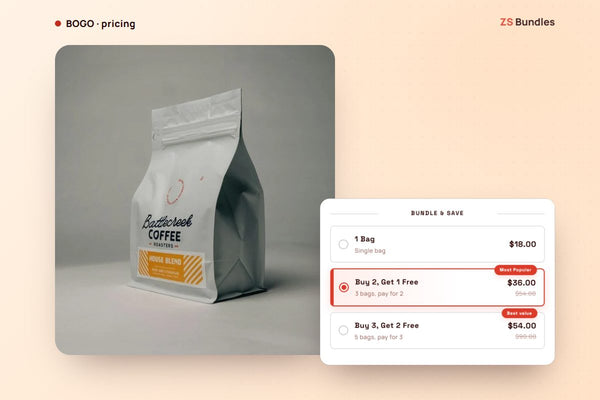
2. Buy 2, get 1 free
Easy to understand in a crowded inbox. It is 33% off each item, so check the margin first. How to set up BOGO.
3. Gift sets for the holidays
Black Friday is also when people start Christmas shopping. A fixed set (cleanser, serum, cream; a mug and two coffees) with a gift message solves "what do I buy them".
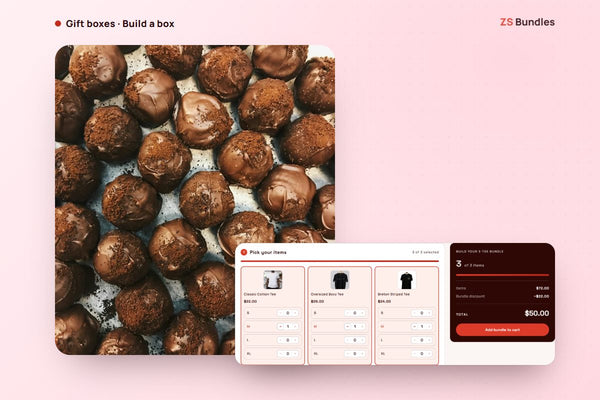
4. Build-your-own gift box
"Any 3 for $50" lets the shopper choose and still gives you a fixed basket size. How to build a mix and match box.
5. Free gift tiers instead of deeper discounts
Free shipping at $50, a free gift at $80. A gift that costs you $4 can feel like $20 to the shopper. How to offer a free gift.
6. Add-ons at the till
A discounted accessory as a tick box under the product ("Add the case, 50% off today"). How to add product page upsells.
7. Early access for your best customers
Open the offer a day early to customers with a VIP tag or to signed-in customers, and to everyone else on Black Friday itself.
Option 1: Shopify's built-in discounts
Shopify's automatic discounts can be scheduled:
- Go to Discounts → Create discount and pick the type (Amount off products, Buy X get Y, Amount off order or Free shipping).
- Choose Automatic discount.
- Under Active dates, set the start date and time, tick Set end date, and set the end.
- Check Combinations so your BFCM discount and any existing discounts combine the way you intend.
This handles the dates well. What it does not do is show the offer on the product page: the shopper sees the saving in the cart or at checkout. Tiers ("buy 2 / buy 3") mean several discounts, and there is no countdown.
Option 2: Scheduled bundles with ZS Bundles
ZS Bundles shows the offer on the product page, above the Add to cart button, and Shopify applies the price at checkout. For BFCM you set it up ahead of time and let it switch itself on and off.
- Install ZS Bundles, press Turn on in theme, and Save.
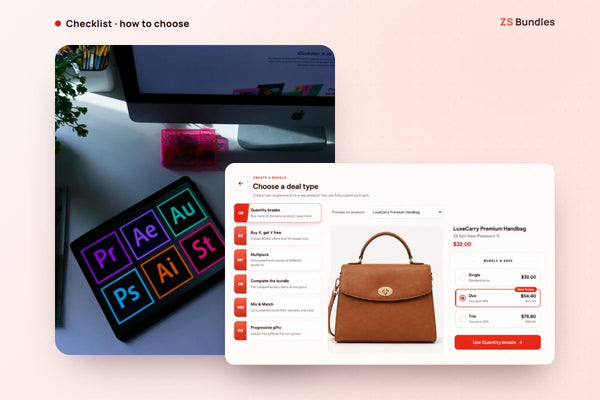
- Create bundle deal and choose the type. The Black Friday deal template is first in the list: buy 2 save 20%, buy 3 save 30%, starting with your own product. Quantity breaks, Buy X, get Y free, Mix & Match and Progressive gifts are there too.
- Under Active dates, set the Start date and time, tick Set end date, and set the end. Until it starts, the bundle waits under the Scheduled tab.
- Optional: turn on Countdown timer and choose When this bundle's schedule ends, so the clock counts down to the real deadline.
- Optional: under Who can see this bundle, choose Customers with certain tags (for example vip) for early access, then make a second bundle for everyone that starts on Black Friday.
- Publish.
The schedule is checked at checkout too, so a cart saved on Wednesday cannot keep the Black Friday price after the offer ends.
See the Black Friday gift box demo Install ZS Bundles free
A simple BFCM timeline
- Early November: pick two or three offers and the products they go on. Fewer, clearer offers beat a page full of badges.
- Mid November: build them in the app, set the dates and let them wait under Scheduled. To test checkout, publish a copy without dates on one product, place a test order, then delete the copy.
- Black Friday to Cyber Monday: leave the offers alone. Watch stock and answer customer questions instead of rebuilding deals.
- The week after: the schedule switches everything off. Compare order value with the weeks before, and keep the offer that worked for December.
Which plan you need
The free plan keeps one bundle live at a time, up to 20 bundle orders a month, which is enough to try a single Black Friday offer. Running several offers at once needs a paid plan: Starter ($12.99) covers 500 bundle orders a month and adds countdown timers and checkbox upsells; Scale ($24.99) covers 2,000 and adds progressive free gifts and A/B testing. Paid plans have a 14-day free trial, so you can upgrade before Black Friday and see it work before you pay.
A BFCM checklist
- Run your numbers first. Work out the margin on each tier with the bundle discount calculator before you announce anything.
- Set it up by mid-November. Build and test the bundles while things are quiet, then let the schedule switch them on.
- Use honest deadlines. A countdown that resets on every visit damages trust. Tie it to the real end date.
- Check stock on the bundled products. A bundle with a sold-out item cannot sell.
- Test checkout on your phone. Add the bundle, change quantities, remove an item, and confirm the price follows.
- Compare with last year. Look at average order value and revenue per visitor, not only the number of orders.